Session Management
Session management is a core aspect of O&M monitoring, used to record and control the real-time connection status and historical access traces between end-users and cloud desktops.
1. Current Sessions
Through the "O&M -> Sessions -> Current Sessions" page, tenant administrators can view all real-time connected sessions within their tenant.
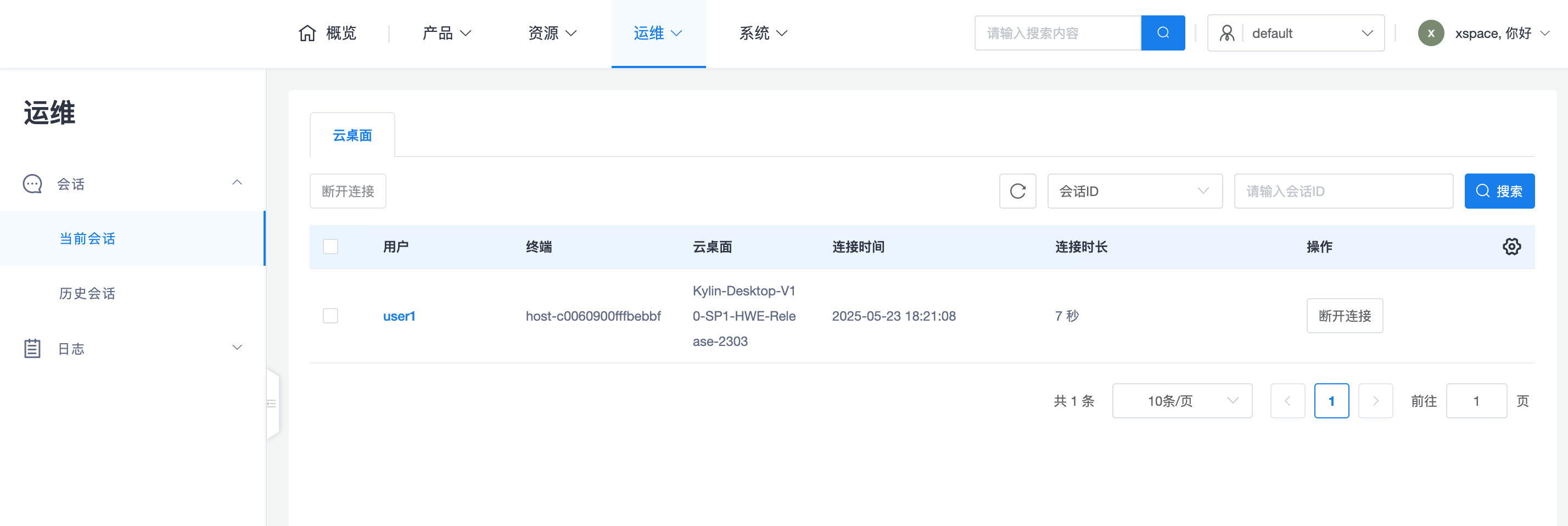
1.1 Real-time Monitoring Attributes
Administrators can intuitively monitor the following key information:
- Users and Resources: Which user is using which cloud desktop.
- Accessing Terminal: Which terminal device (thin client, soft client, or mobile device) the user initiated the connection from.
- Connection Details: Includes login time, duration, and the client's IP address.
- Access Method: Displays the current session client's location, whether it's accessed via internal network or public network.
1.2 O&M Operations
- Disconnect: When abnormal login is detected or resources need to be forcefully reclaimed, administrators can forcibly disconnect specified real-time sessions.
- Data Export: Supports exporting the current session list for real-time resource usage analysis.
2. Historical Sessions
Through the "O&M -> Sessions -> Historical Sessions" page, tenant administrators can trace all access records within a period of time.
2.1 Tracing and Auditing
Historical sessions fully record the entire lifecycle of a session from "establishment" to "destruction", serving as an important basis for security auditing and troubleshooting:
- Login/Logout Time: Accurately counts the user's actual online duration.
- Session Status: Records whether the session was closed normally or disconnected abnormally.
- Historical Trace: By filtering specific users or desktops, view their historical access frequency and terminal distribution.
2.2 Data Statistics and Analysis
- Batch Export: Supports filtering and exporting historical session tables based on a time range.
- Application Scenarios:
- Work Hour Statistics: Combine with exported reports to further analyze user login and usage, providing data support for resource expansion.
- Compliance Audit: Meet enterprise requirements for traceability of asset access behavior. ```