Add UCloud Cloud Platform
The xSpace management component integrates with UCloud's API interfaces to manage public or private cloud computing resources. Due to UCloud's resource organization logic differing from other privately deployed cloud platforms, please pay attention to the following characteristics when integrating.
1. Pre-requisite: Obtain Access Key
The UCloud cloud platform does not use usernames and passwords for API access; instead, it uses API keys for authentication.
- Acquisition Path: Log in to the UCloud console, and enter key management from the user center in the upper right corner.
- Obtain Public and Private Keys:
- Public Key: Corresponds to AccessKey ID in the management component.
- Private Key: Corresponds to AccessKey Secret in the management component.
- Determine Region Identifier: View the region option in the upper right corner of the console and record the region identifier where the current resources are located.
2. Core Mapping Logic
2.1 Project Mapping
Unlike SmartX or WxStack, the UCloud cloud platform currently does not support dividing project resources by means of custom group prefixes.
- Default Project: After the system integrates with the UCloud cloud platform, a project named
defaultwill be automatically generated. - Resource Aggregation: All virtual machine instances, cloud disks, and other resources within this region that meet the synchronization conditions will be uniformly aggregated into this
defaultproject.
2.2 Management Capability Limitations
Please note that the current management component's integration with the UCloud cloud platform primarily focuses on synchronizing existing resources.
- Supported: Desktop synchronization import, power management (on/off/restart), password reset.
- Not Supported: Currently, dynamic creation or deletion of desktops in the UCloud cloud platform through the management component is not supported.
3. Operation Process
3.1 Access Interface
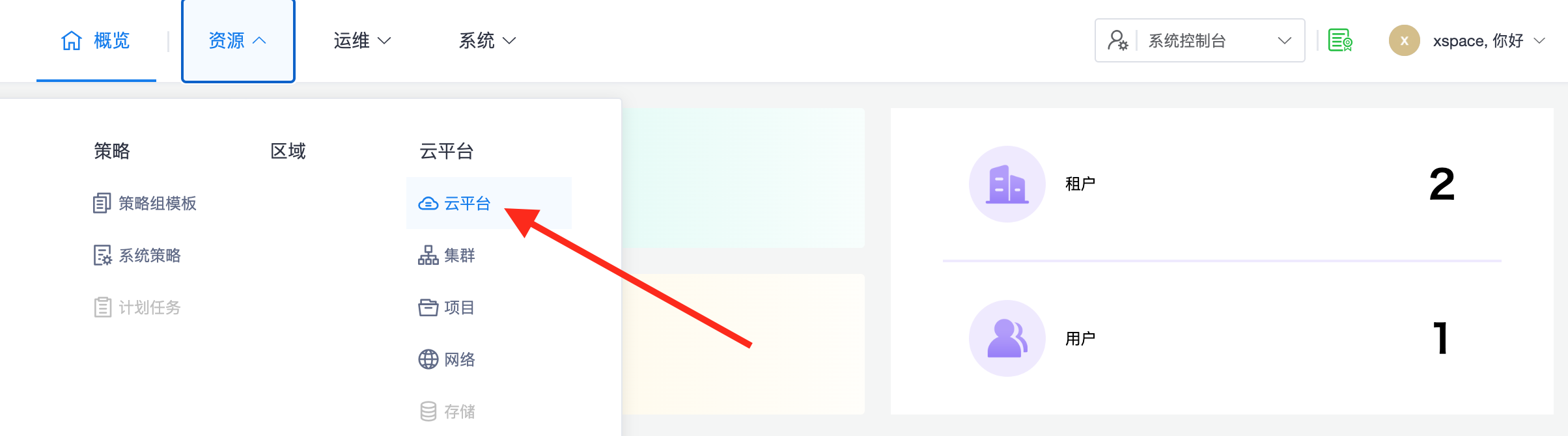
Log in to the xSpace system console and access "Resources -> Cloud Platforms".
3.2 Initiate Addition
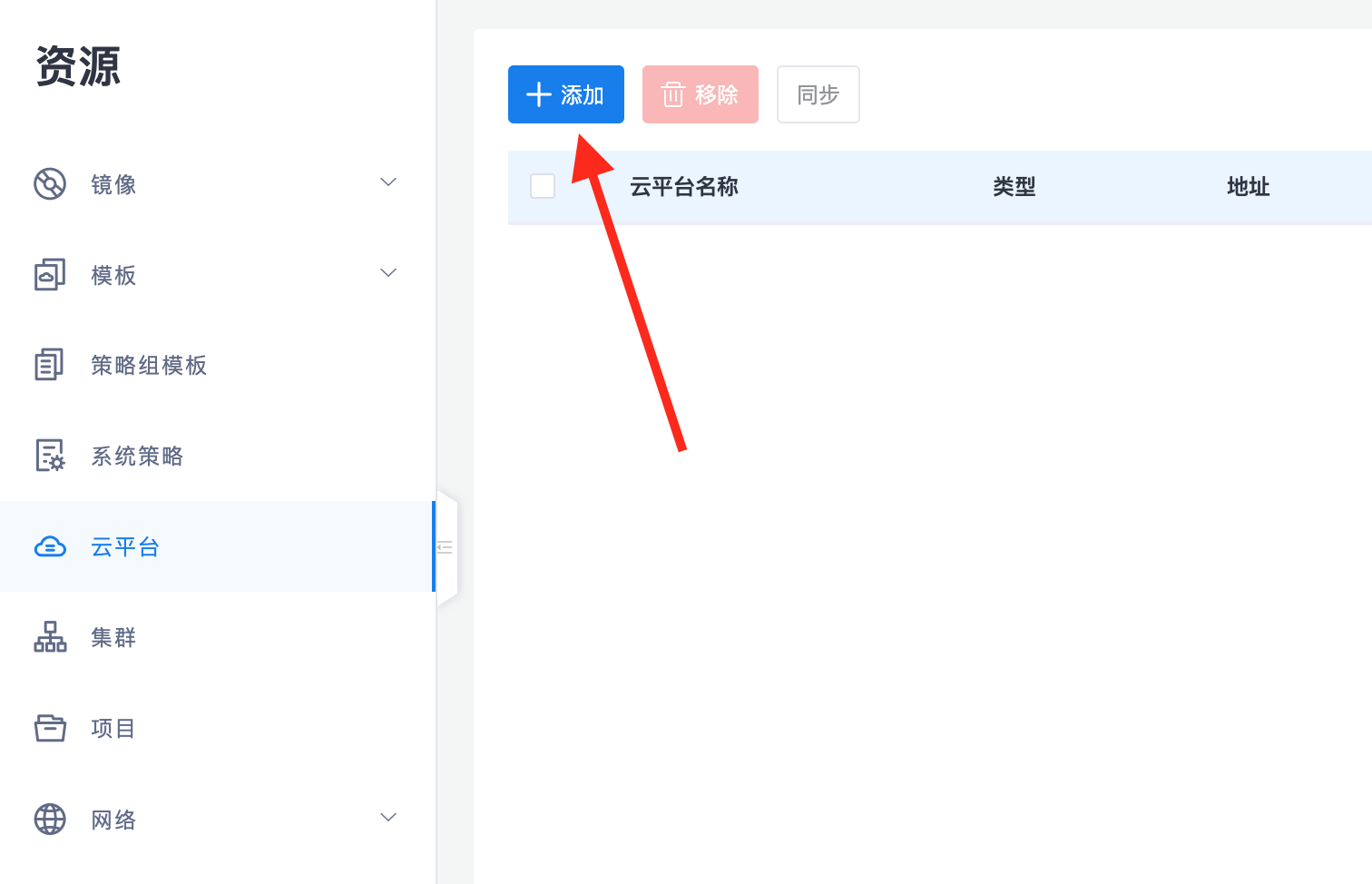
Click the "Add" button in the upper left corner of the page.
3.3 Configure UCloud Attributes
Enter the API access parameters, ensuring that the public/private key pair and region information are filled in accurately.
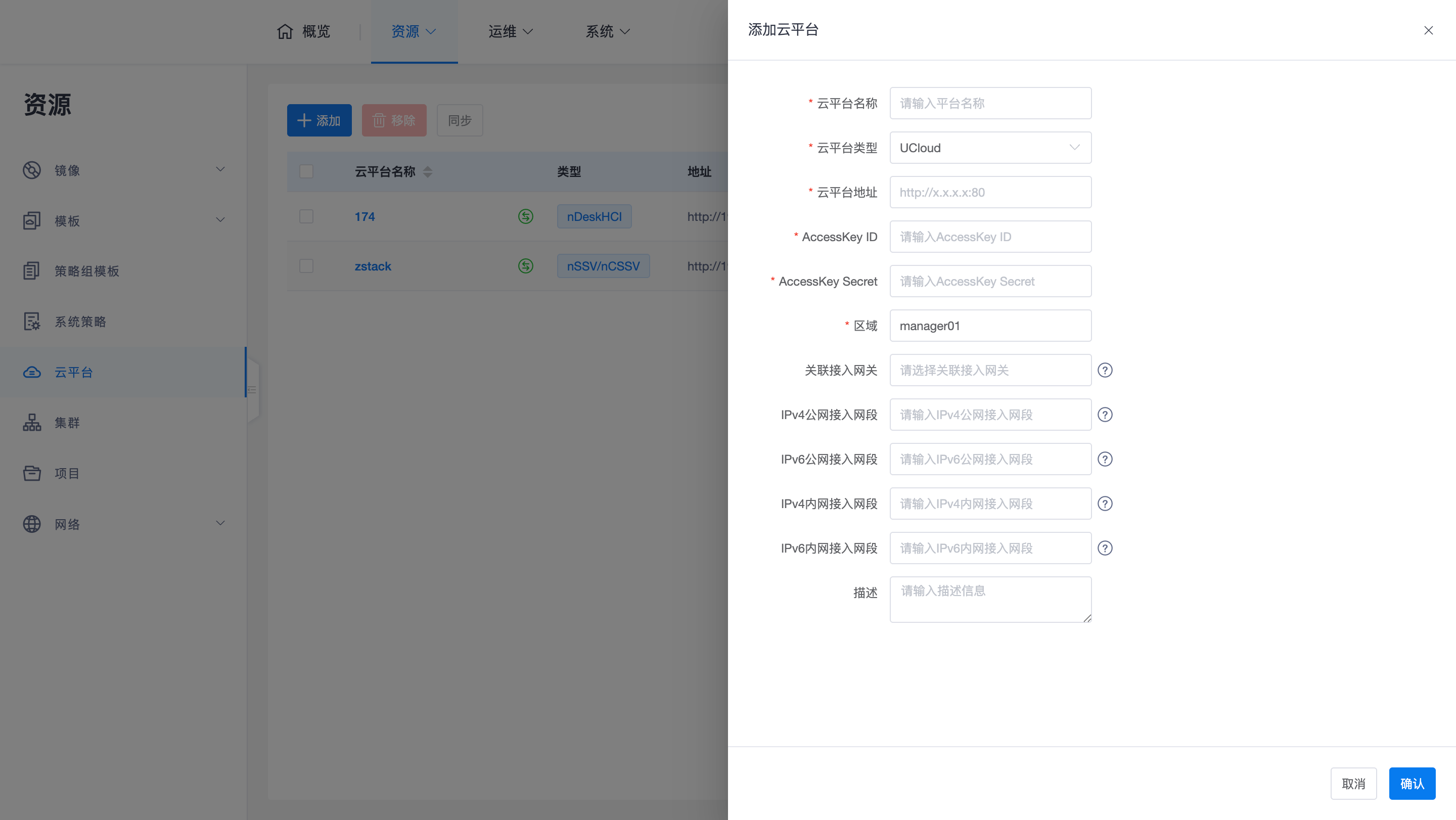
- Cloud Platform Address: The access endpoint (API Endpoint) for UCloud's API.
- AccessKey ID: Fill in UCloud's API Public Key.
- AccessKey Secret: Fill in UCloud's API Private Key.
- Region: Fill in the region identifier corresponding to the console.
4. Core O&M Notes
4.1 Resource Management Notes
Since UCloud does not support group prefix filtering, it is recommended to apply for an independent sub-account (and corresponding AK/AS) specifically for cloud desktop services on the UCloud cloud platform. This achieves logical isolation of underlying resources and prevents other business hosts in the production environment from being synchronized into xSpace.
4.2 Security Tip
Please keep your API private key secure. If the key is leaked, please reset the key on the UCloud cloud platform and update the configuration in the xSpace management component in a timely manner.
Note: For automatic synchronization mechanisms, progress monitoring, and troubleshooting after adding a cloud platform, please refer to Cloud Platform Overview -> 3. Resource Synchronization and Management Mechanism section.