Cloud Platform Overview
The xSpace management component is deployed as multiple virtual machines on an IaaS virtualization cloud platform. It supports integrating with one or more cloud platforms, using them as underlying basic computing resource pools. The management component calls the API interfaces of these cloud platforms to achieve resource synchronization, creation of desktop virtual machines, and daily maintenance.
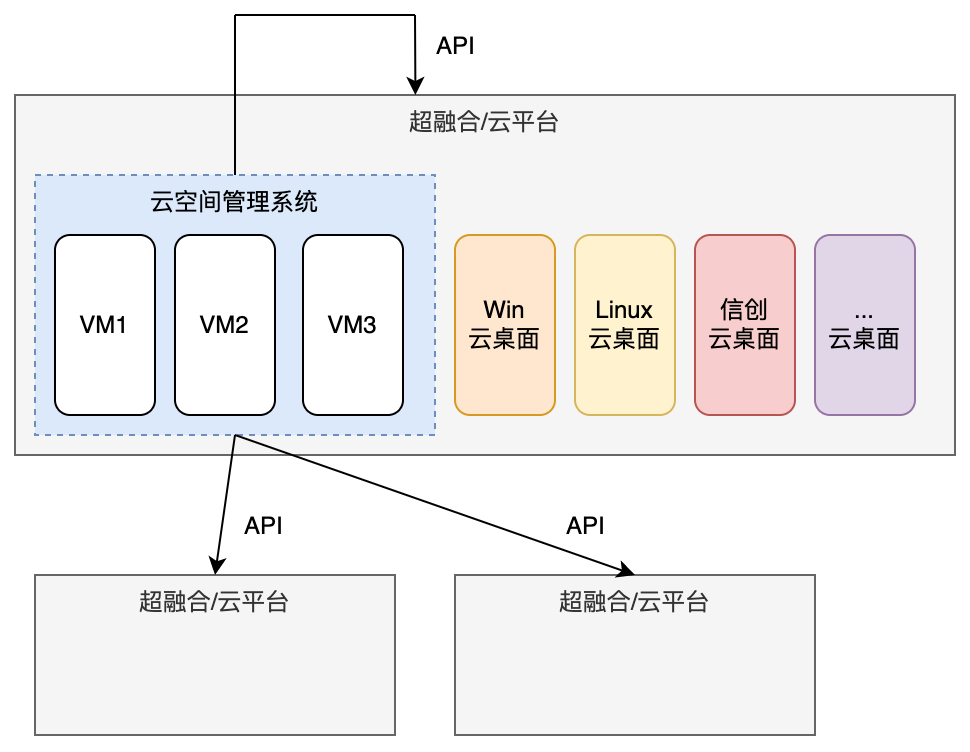
After completing the version upload and understanding tenant and role permissions, adding a cloud platform is the first step to providing computing resources for a newly deployed xSpace. In real-world scenarios, the format of access information required to access different cloud platforms varies.
Tip: This chapter mainly introduces the common processes and parameters for cloud platform integration. Specific access attribute fields and detailed configurations unique to different cloud platform types (such as OpenStack, ZStack, etc.) will be explained in detail in subsequent dedicated chapters for each cloud platform.
1. Cloud Platform Adaptation and Capability Differences
Before adding a cloud platform, please refer to Installation Deployment -> Deploy Management Component -> Environment Requirements to verify the supported cloud platforms and version numbers.
1.1 Type Alignment Description
- The model capabilities and operational logic of InCloud, nDeskHCI, and WxVDI Cloud are the same as OpenStack.
- The model capabilities and operational logic of nSSV/nCSSV are the same as ZStack.
1.2 Platform Model and Capability Difference Table
Different cloud platforms have significant differences in project abstraction, resource synchronization, and desktop management capabilities. Please refer to the table below:
| Dimension | Feature Item | OpenStack | SmartX | UCloud | WxStack | ZStack |
|---|---|---|---|---|---|---|
| Project Concept | Project Definition | Project | VM Group | Project | Business Group | Host Group |
| Cloud Platform Sync | Template | No | Yes | No | Yes | No |
| Image | Yes | No | Yes | No | Yes | |
| Flavor | Yes | No | No | No | Yes | |
| Shared Network | Yes | No | Yes | Yes | Yes | |
| Disk Type | Yes | Yes | Yes | Yes | Yes | |
| Project Sync | Project/Instance | Yes | Yes | Yes | Yes | Yes |
| Private Network | Yes | Yes | No | No | No | |
| Cloud Disk | Yes | Yes | Yes | Yes | Yes | |
| Custom Creation | Auto Create Project | Supported | Not Supported | Not Supported | Not Supported | Supported |
| Custom Flavor | Not Supported | Not Supported | Not Supported | Not Supported | Supported | |
| Desktop Management | Desktop Sync Import | Supported | Supported | Supported | Supported | Supported |
| Desktop Creation | Supported | Supported | Not Supported | Supported | Supported | |
| Desktop Deletion | Supported | Supported | Not Supported | Supported | Supported | |
| Console | Supported | Not Supported | Not Supported | Not Supported | Supported | |
| Power On/Off/Restart | Supported | Supported | Supported | Supported | Supported | |
| Reset Password | Supported | Supported | Supported | Supported | Supported | |
| Restore/Change Desktop | Supported | Not Supported | Not Supported | Not Supported | Not Supported | |
| Create Image | Supported | Not Supported | Not Supported | Not Supported | Supported |
2. Cloud Platform Common Parameter Configuration (Commonality)
When adding a cloud platform, the following common parameters directly affect the client's connection experience:
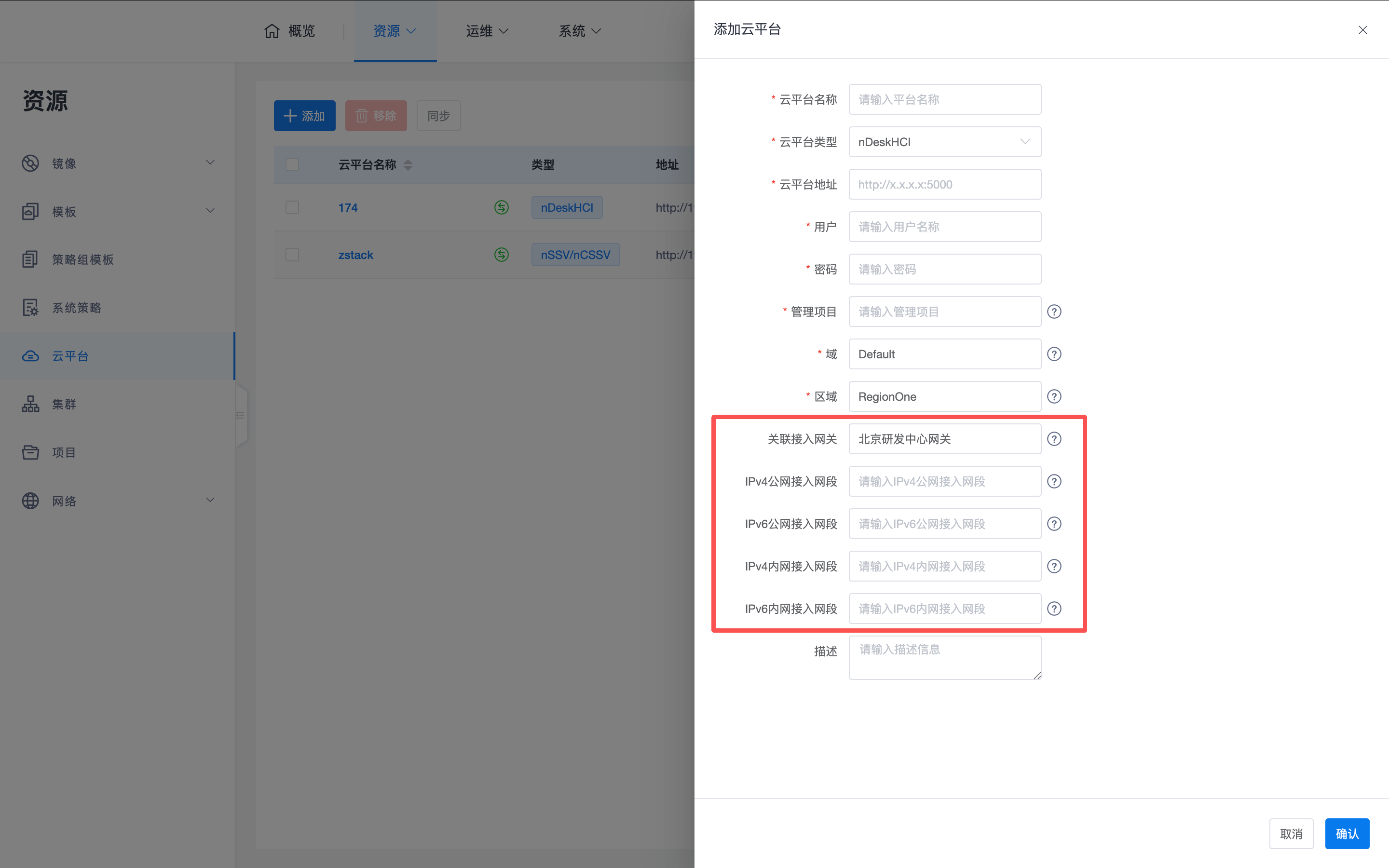
- Associate Access Gateway: When a client accesses from the public network, the associated access gateway cluster will provide public network access and forwarding services for cloud desktops within that cloud platform.
- Access Network Segment (IPv4/IPv6 Public and Private Networks):
- Identification Logic: When a desktop has multiple NICs, the system will identify the address of a NIC matching the client's access location.
- Internal Network Access: If the client is on the internal network, the management component will return the address of a NIC matching the internal network segment to the client, for direct connection via the HSR protocol.
- Public Network Access: If the client is on the public network, the management component will return the address of a NIC matching the public network segment to the client, for connection via the access gateway.
- Importance: If a desktop has dual NICs, this item must be configured accurately, otherwise it may lead to missing cloud desktop IP addresses, resulting in the client being unable to obtain desktop IP addresses and establish remote connections.
3. Resource Synchronization and Management Mechanism
After the system is successfully added, the management component will automatically establish communication with the underlying cloud platform and initiate the resource synchronization process.
3.1 Synchronization Trigger Mechanism
- First Synchronization: After adding a cloud platform, the system will not synchronize immediately, but will automatically trigger the first resource synchronization after approximately 20 seconds.
- Timed Cycle: The system will randomly trigger automatic synchronization at intervals of 40-80 minutes (approximately once per hour) to ensure eventual consistency of resource status.
- Manual Intervention:
- Detection: Click the "Detect" button to quickly determine API accessibility (verify if network, account, and password are correct).
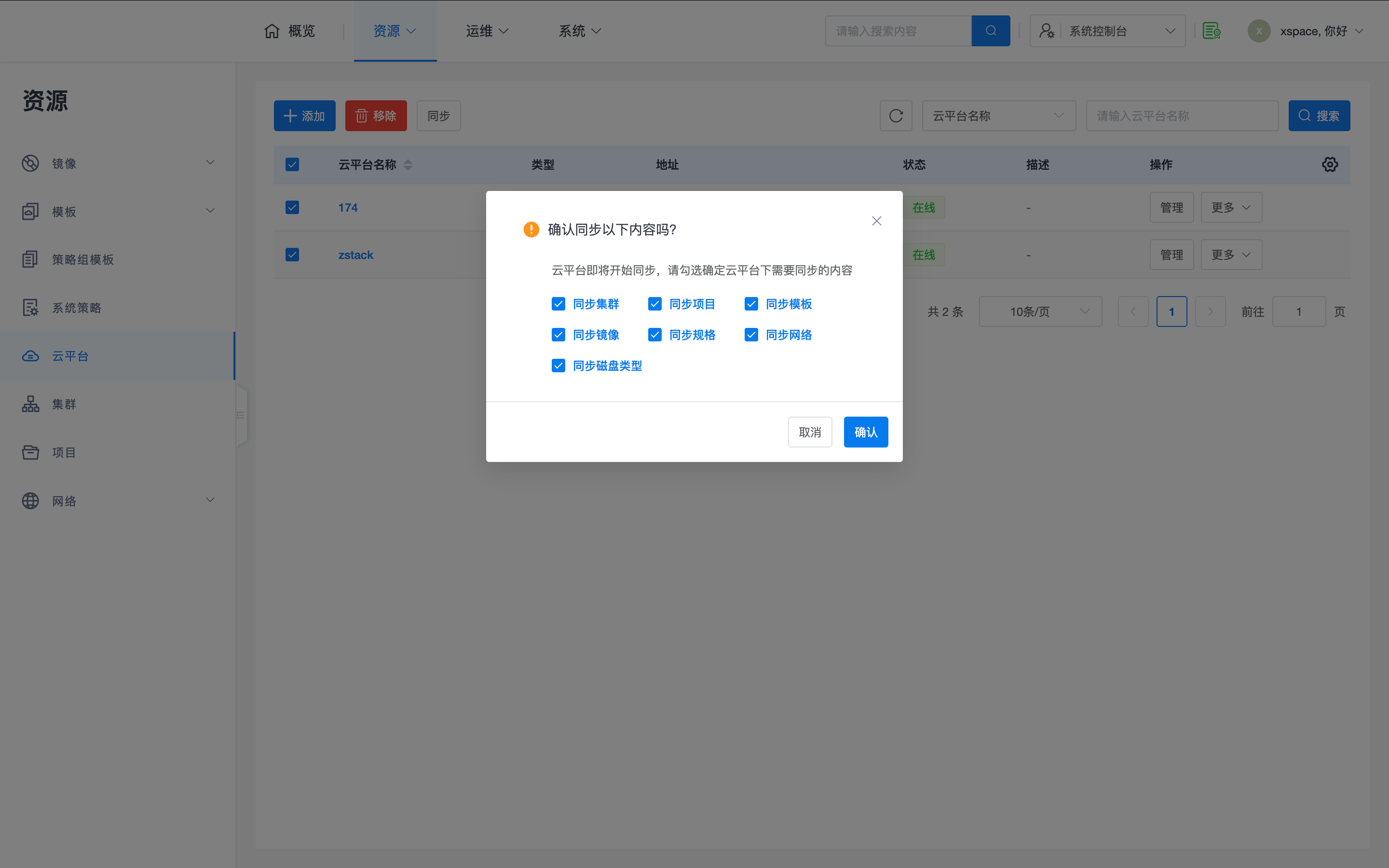
- Force Sync: If automatic synchronization is not triggered in time, or there are urgent changes to underlying resources, you can click "More -> Sync" on the right side of the table to manually trigger it.
3.2 View Synchronization Progress and Results
Administrators can track resource loading status in real-time:
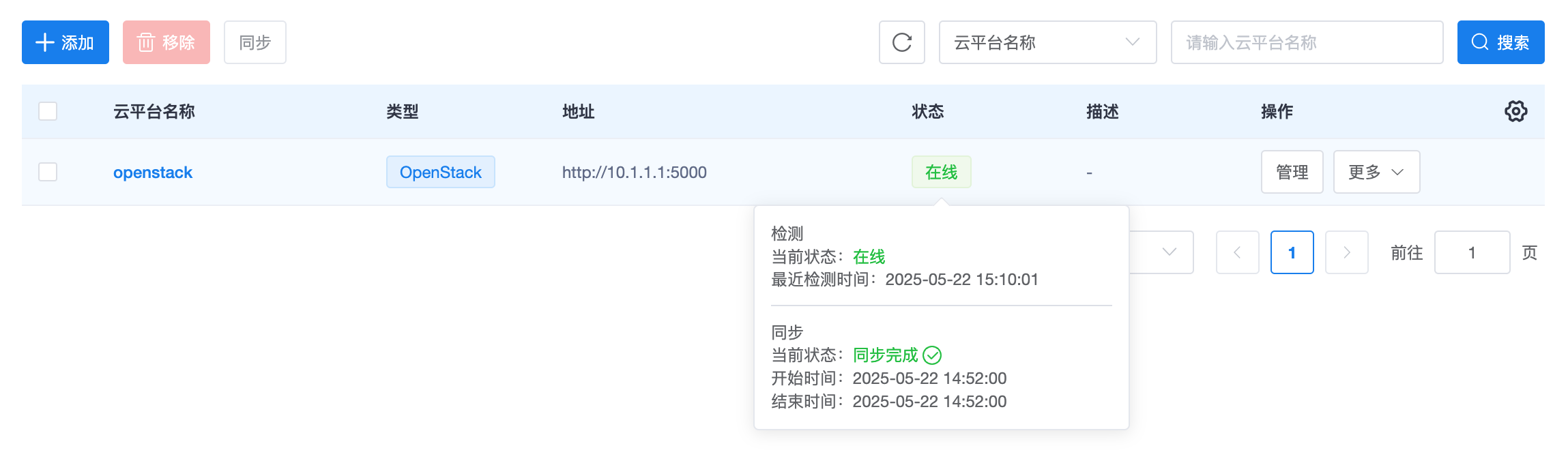
- View Details: Click the synchronization status icon at the end of the "Cloud Platform Name" column in the cloud platform list. The system will pop up detailed synchronization progress tags.
- Covered Content: You can observe the success/failure status of various resources such as Clusters, Projects, Templates, Images, Flavors, Networks, and Disk Types.
3.3 Anomaly Troubleshooting Guide
If the cloud platform status is abnormal or synchronization fails, please refer to the following table for troubleshooting:
| Phenomenon | Possible Cause | Suggested Action |
|---|---|---|
| Cloud platform offline | Incorrect API address, username, or password; network unreachable | Check cloud platform access parameters, use the "Detect" function to verify API connectivity. |
| Sync timeout | High network latency; slow underlying platform response | Try clicking "Manual Sync"; check bandwidth latency between management component and cloud platform. |
| Specific resource missing | Resource does not match "Group Prefix"; insufficient underlying permissions | Check resource group naming on the cloud platform side; ensure the account used has system administrator privileges. |
| Other persistent failures | Adapter layer interface exception or version incompatibility | Collect error messages from sync details, cloud platform model and version number, and contact vendor technical support. |
3.4 Management Entry Point Description
- Resource Maintenance: Click the "Manage" button of the cloud platform to maintain its associated resources such as templates, images, flavors, shared networks, and disk types.
- Logical Attribution: To simplify the hierarchy of operation pages, Clusters and Projects are elevated to the same level as cloud platforms in the menu, but logically they still belong to their respective cloud platforms.
4. Restrictions on Removing Cloud Platforms
- Preconditions: Resources under this cloud platform (e.g., projects, instances) are not actually used by tenants (not associated with desktop pools or desktops).
- Scenario Recommendation: The removal operation is only recommended during the initial deployment of the environment or when configuration errors occur. If business data is already associated, removing the cloud platform is not allowed.