Completion Verification
After all the above installation steps are completed, all components of the xSpace management backend, as well as dependent third-party middleware services (such as database servers, message servers, file servers, etc.), will be automatically started by default.
⚠️ Core Operation Guidelines:
Execution Location: Unless otherwise specified, all
kubectlcommands,as6tuitools, and operation scripts mentioned below must be executed on the Master Node.Permission Requirements: All operations require
sudoprivileges. It is recommended to log in as thexspaceuser and then prependsudoto commands.
1. Runtime Status Check
Due to complex runtime dependencies between system components, it typically takes 10-15 minutes for the entire system to start up. The specific time depends on the virtual machine's processor performance and the actual speed of underlying storage I/O.
During this waiting period, you can execute the following script at any time to check the current runtime status:
[xspace@host151 ~]# sudo /opt/installation/scripts/env_check.sh 0
Note:
This script will sequentially check whether all components and middleware are running normally.
If there are abnormal statuses that are not yet ready, the script output will be displayed in red warning text.
If the script detects that the system fails to enter a normal running state for an extended period during installation, please contact technical support.
If the virtual machine environment is restarted subsequently, a waiting period is also required, and this script can be used to check the status during that time.
2. Container Cluster Maintenance
All components of the xSpace management backend run in a containerized cluster. Daily operation and maintenance will frequently use kubectl commands.
For specific usage, please refer to the official kubectl documentation.
2.1 Common Maintenance Command Examples
View Cluster Node Status:
[xspace@host151 ~]$ sudo kubectl get nodes
NAME      STATUS   ROLES                  AGE   VERSION
host153   Ready    <none>                 12d   v1.24.9+k3s1
host151   Ready    control-plane,master,namesrv,rocketmq,xspace   12d   v1.24.9+k3s1
host152   Ready    namesrv,rocketmq,xspace                        12d   v1.24.9+k3s1
Note: If any nodes are not in a Ready state, please check the startup status of the corresponding virtual machine and network connectivity.
View All Namespaces:
[xspace@host151 ~]$ sudo kubectl get ns
NAME              STATUS   AGE
default           Active   11d
kube-system       Active   11d
kube-public       Active   11d
kube-node-lease   Active   11d
xspace            Active   11d
bream             Active   11d
mist              Active   11d
middleware        Active   11d
nginx             Active   11d
View Pod Component List and Status in xSpace Namespace (Example Result):
[xspace@host151 ~]$ sudo kubectl get pods -n xspace
NAME                                            READY   STATUS      RESTARTS      AGE
bream-migrate-dwm6w                             0/1     Completed   0             11d
panda-migrate-46z8x                             0/1     Completed   0             11d
tunny-migrate-bzrgs                             0/1     Completed   0             11d
zebra-migrate-5btlx                             0/1     Completed   0             11d
app-file-server-6fd9d849b7-zsph7                2/2     Running     0             11d
app-instance-service-7ccbf484cc-fhm6n           2/2     Running     0             11d
app-zebra-config-service-67b6db6f5d-sk567       2/2     Running     0             11d
app-platform-service-546dbc5c6d-69pbt           2/2     Running     0             11d
app-policy-service-6c8d697c9d-8xnkq             2/2     Running     0             11d
app-gateway-server-7f6469f6b7-2mlms             2/2     Running     0             11d
app-image-service-55c4494d8b-c7gtx              2/2     Running     0             11d
app-log-server-649d6885cb-x8cd7                 2/2     Running     0             11d
app-tunny-config-service-5f8998f6b4-7zjdw       2/2     Running     0             11d
app-region-service-64d4d69869-v47gz             2/2     Running     0             11d
app-tenant-service-5c6b7f8b97-pm8j6             2/2     Running     0             11d
app-search-server-78c7b86695-mtbtf              2/2     Running     0             11d
app-vpc-service-57b8f4489-r2bgp                 2/2     Running     0             11d
app-session-service-644cb868b5-k4v7t            2/2     Running     0             11d
app-uaa-server-9b947756f-mt56x                  2/2     Running     0             11d
app-bff-service-85f869747f-7njvz                2/2     Running     0             11d
app-data-sync-server-555f8dd8c6-5cfqr           2/2     Running     0             11d
app-project-service-548d789cf5-25fkt            2/2     Running     0             11d
app-volume-service-775fbdd4-4tr6t               2/2     Running     0             11d
app-access-gateway-service-7448948955-fpb5p     2/2     Running     0             11d
app-terminal-service-7c8d77b74-wrmp7            2/2     Running     0             11d
app-template-service-6bf584b8cf-v6qfg           2/2     Running     0             11d
app-resource-template-service-754f56c78f-hzsgk  2/2     Running     0             11d
app-panda-config-service-799bfff7dc-sqfgc       2/2     Running     0             11d
app-version-service-78f875dfd-9xkfp             2/2     Running     0             11d
app-flavor-service-7df445896-v7dwv              2/2     Running     0             11d
app-desktop-service-5b59d6b6b9-z4kk6            2/2     Running     0             11d
app-user-service-bdf5f4ff9-qmvdb                2/2     Running     1 (11d ago)   11d
app-cluster-service-846f5c74c9-wgxc9            2/2     Running     1 (11d ago)   11d
Note: During normal operation, component POD status should be Completed or Running.
2.2 Using as6tui Graphical Console
In addition to executing commands manually, you can also enter the as6tui command to operate directly using the character console interface:
[xspace@host151 ~]# sudo su
[root@host151 ~]# as6tui
Interface Interaction Instructions:
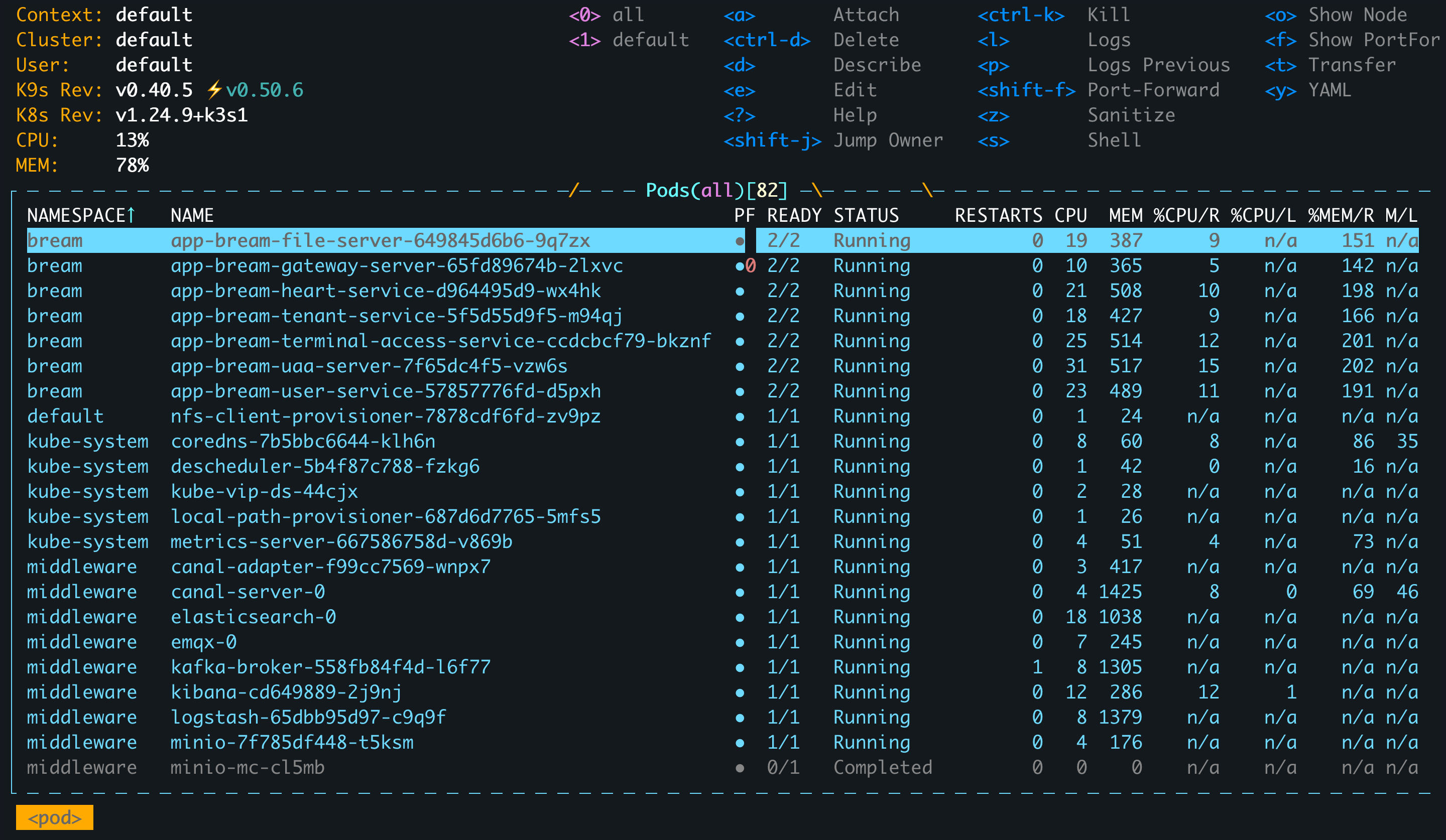
- Enter question mark character
?: View all complete help text. - Enter
s: Enter the Shell interaction within the currently selected component. - Enter
:q: Exit the entire character console interface. - For more key operations, refer to the tips at the top of the interface.
3. Automated O&M and Node Load Rebalancing
The system comes with pre-configured automated maintenance scripts that have been added to scheduled tasks:
[root@host151 ~]# crontab -l
0 * * * * /opt/installation/scripts/resolve_env.sh >> /var/log/resolve_env.log
0 3 * * * /opt/installation/scripts/rebalance_env.sh >> /var/log/rebalance_env.log
Function Description:
- Environment Repair (
resolve_env.sh): Ifxxl-jobfor a service is found not to be registered, this script can be manually executed to repair it.
[root@host151 ~]# /opt/installation/scripts/env_check.sh 6
----------------------------------------------------------------------
[Xxljob Condition]
----------------------------------------------------------------------
xxljob executor cluster-service registered.
xxljob executor instance-service registered.
xxljob executor project-service registered.
xxljob executor terminal-service registered.
xxljob executor desktop-service registered.
xxljob executor platform-service registered.
xxljob executor session-service registered.
xxljob executor resource-template-service registered.
- Load Balancing (
rebalance_env.sh): View node load usingsudo kubectl top nodes. If the load is extremely uneven (e.g., max memory >80%, min memory <60%), execute this script to trigger re-scheduling by restarting PODs, achieving node load rebalancing.
[root@host151 ~]# kubectl top nodes
NAME      CPU(cores)   CPU%   MEMORY(bytes)   MEMORY%
host151   1501m        18%    12367Mi         79%
host152   841m         10%    9180Mi          59%
host153   1284m        16%    10015Mi         64%