Networking and Connectivity Requirements
This chapter details the recommended resource configuration, network architecture topology, and access relationships between components for xSpace in actual production environments, providing a reference for system deployment and firewall policy configuration.
1. Resource Specification List
In a typical production environment, the recommended minimum resource configuration is shown in the table below:
| Component Name | Recommended Specification | Operating System | Deployment Description |
|---|---|---|---|
| Management Component | 3 VMs × 8C/16G/200G | openEuler 22.03 | Deployed as a K3s container cluster, requires 3 static internal IP addresses. |
| Access Gateway | 1 or more VMs × 4C/8G/100G | Ubuntu 22.04.5 | Recommended single NIC deployment, each requires 1 static internal IP, with a 1:1 public IP mapping. |
| Agent | Configure cloud desktop specifications and quantity according to business needs | Windows/Linux | Installed inside each cloud desktop VM, requires pre-installation of Mole/HSRServer/USBRedirect software packages, and pre-configuration of Mole pointing to the management component address. |
| Client | PC / Laptop / Mobile Phone / Tablet / Thin Client | Windows, Linux, macOS, Android | Requires network connectivity to the management component, access gateway, and cloud desktops. |
2. Connectivity Requirements Analysis
2.1 Core Management Link
- Management Component Cluster Internal: The 3 management component VMs must maintain Layer 2 network connectivity for internal heartbeat monitoring and data synchronization within the container cluster. The IP address of the master node serves as the service interface address for the entire management component.
- Southbound Management Interface: All management component nodes must be able to access the API interface address of the underlying IaaS cloud platform (used for desktop creation, power on/off, resource synchronization, etc.).
- Agent Control Link: The agent (Mole service) inside the cloud desktop needs to be able to access the management component for status reporting, management command acquisition, and version upgrades.
2.2 Business Access Link
- Management Backend Access: System administrators and tenant administrators access the management component's TCP 443 port via a browser.
- Client Access: The client accesses the management component's TCP 44301 port (for login, obtaining desktop lists); the protocol layer directly connects or forwards via the gateway to access the cloud desktop's TCP 15701, TCP&UDP 15702, TCP 5703 ports.
3. Port Access Matrix
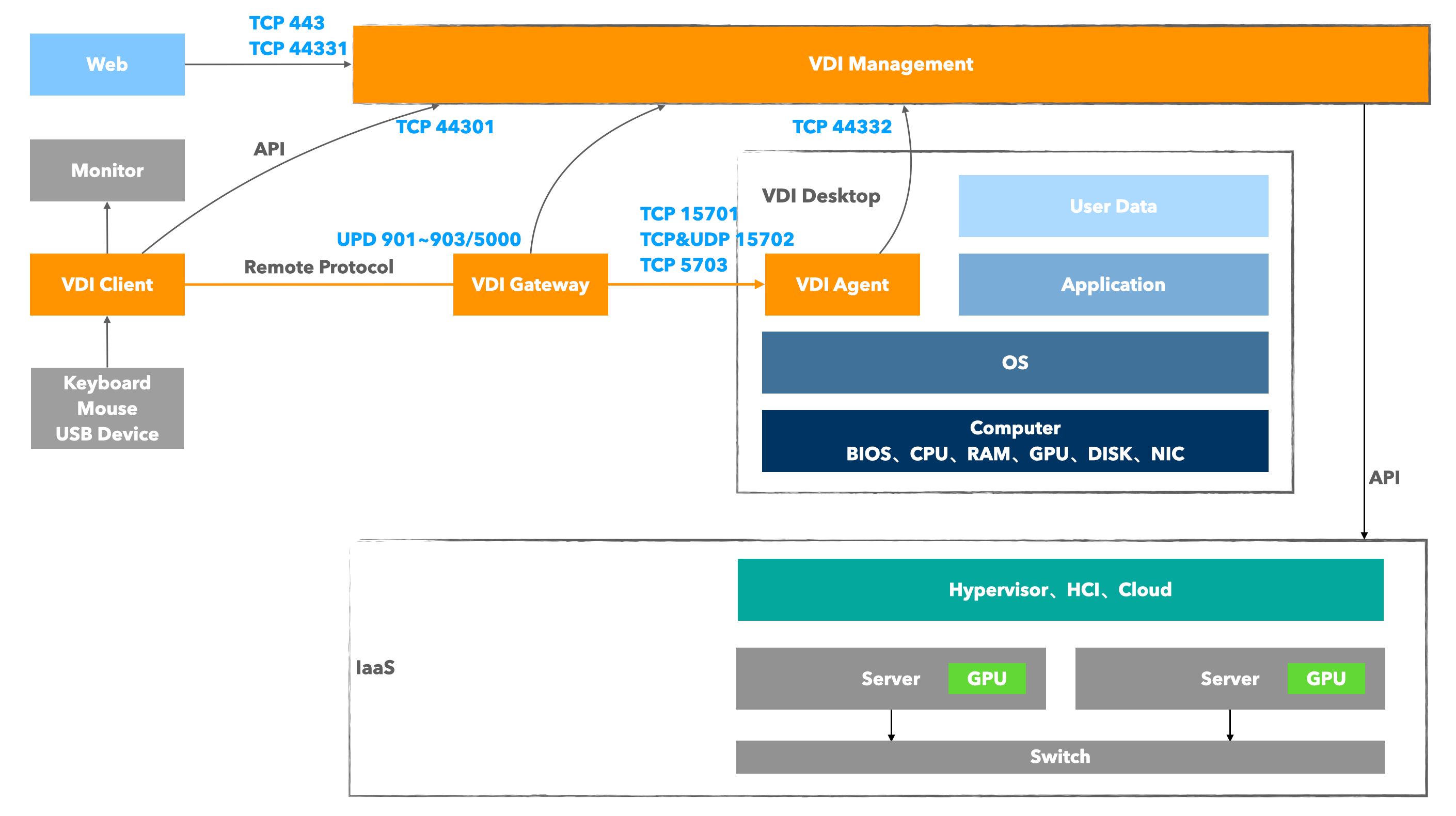
Please configure the allow policy in the firewall or security group according to this table.
3.1 Basic Internal Network Access
| Source Object | Target Object | Destination Port | Protocol | Function Description |
|---|---|---|---|---|
| WEB Browser | Management Component | 443 | TCP | Web management page access |
| Management Component | IaaS Cloud Platform | Depends on the API interface port exposed by the IaaS cloud platform | TCP | Management component access to IaaS cloud platform |
| Agent (Mole) | Management Component | 443, 44332 | TCP | Agent reporting and version upgrades, etc. |
| Client (XSC) | Management Component | 44301 | TCP | Client API calls |
| Client (XSC) | Cloud Desktop | 15701, 15702, 5703 | TCP/UDP | LAN Scenario: Remote desktop protocol direct connection |
3.2 Public Network Access (NAT/Mapping)
If internet access capability needs to be provided, the following public network mappings are required:
| Mapping Path (Public -> Internal) | Destination Port | Protocol | Required/Optional |
|---|---|---|---|
| Public IP : 44031 | Management Component : 44031 | TCP | Required: Supports client access from the public network |
| Public IP : 443 | Management Component : 443 | TCP | Optional: Supports public network access to system console and tenant console, external O&M management |
| Public IP : 44331 | Management Component : 44331 | TCP | Optional: Supports public network access (only) to tenant console, for scenarios with public network operations |
| Gateway Public IP : 901/902/903/5000 | Gateway Internal : 901/902/903/5000 | UDP | Required: Carries HSR protocol traffic forwarding |
Gateway Deployment Key Points:
The internal network address of the access gateway must be routable to the business internal network address of the cloud desktops it serves, otherwise, clients in an external network environment will fail to connect to the cloud desktops.
The public network mappings for management component ports 44301, 443, and 44331 can share the same public IP with the access gateway, meaning one xSpace system can provide public network access services with a single public IP.
However, it is generally recommended that the management component occupies a separate public IP address, and each access gateway then occupies its own public IP address.
4. Public Network Bandwidth Requirement Assessment
When planning public network egress bandwidth, please estimate using the following model:
- Management Traffic Bandwidth: Mainly used for API access and client version package downloads. Recommended to provide a guaranteed bandwidth of 20Mbps ~ 100Mbps.
- Protocol Traffic Bandwidth:
- Calculation Formula:
Total Bandwidth = Estimated Concurrency × Average Traffic per Desktop - Reference Scenario Indicators:
- General office/word processing: approx. 1 ~ 2 Mbps
- HD video/complex web pages: approx. 5 ~ 10 Mbps
- High-end 3D design/video editing: approx. 20 ~ 30 Mbps
- Traffic Direction: Daily protocol traffic mainly consists of screen video streams from the cloud desktop, passing through the gateway to the client. From the data center perspective, this is upstream traffic; from the client side, it is download traffic.
- Calculation Formula:
To ensure stable business delivery, customers need to apply for independent public IP address resources and sufficient public network bandwidth from their Internet Service Provider (ISP) in advance.