Management Component (AS6)
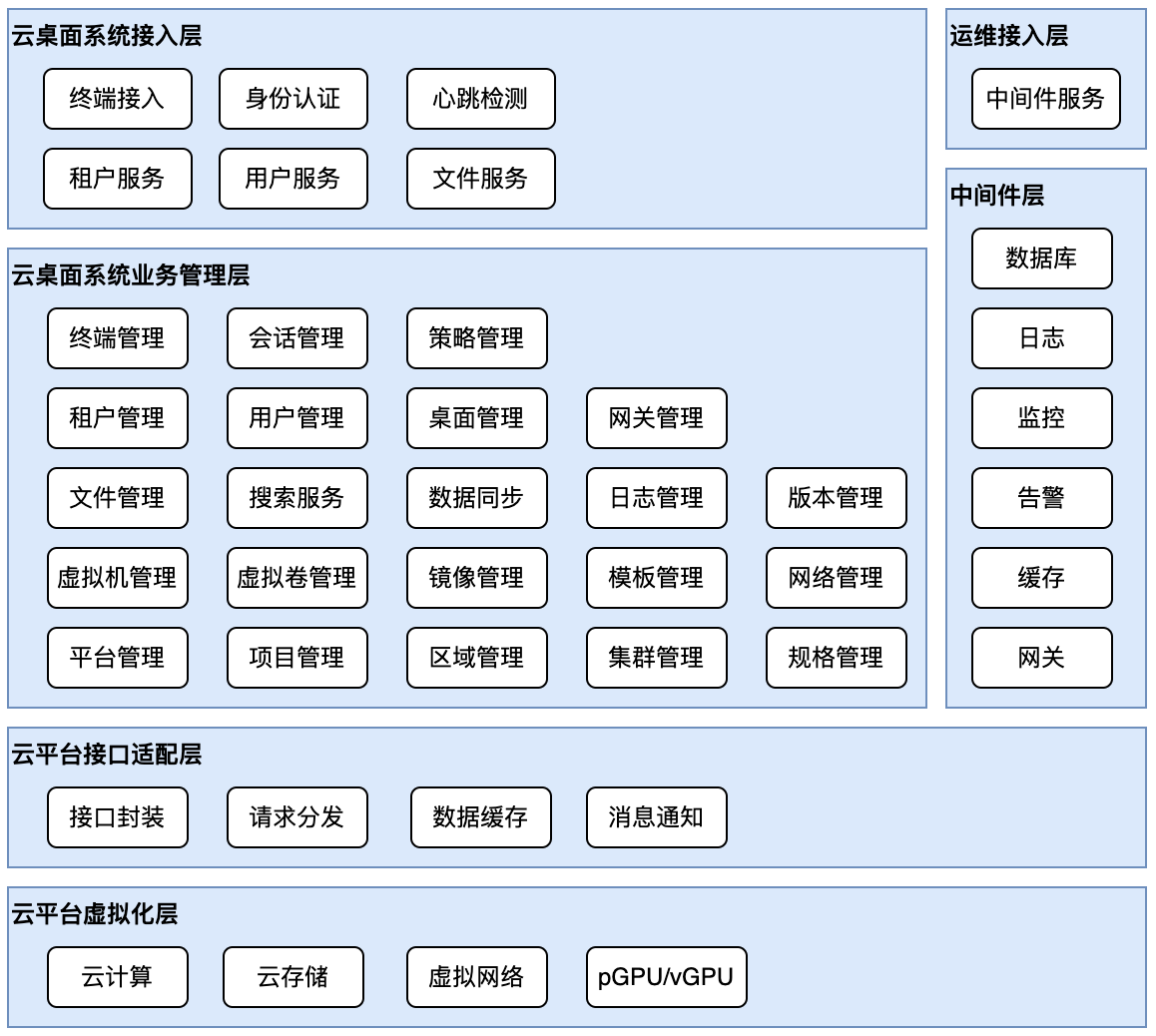
The xSpace Management Component (AS6) is the control plane center of the system. It adopts a modern microservice architecture, deployed in a containerized form within hyper-converged or cloud platform resource pools, providing administrators with a unified Web management portal.
1. System Architecture and Logical Model
1.1 Containerized Base
- The management component is deployed in virtual machines within the hyper-converged/cloud platform.
- Numerous internal sub-components run as K3s container cluster Pods, collectively forming the Web management backend serving administrators.
1.2 Heterogeneous Platform Adaptation (Southbound Integration)
- Platform Concept Model: In xSpace, an IaaS cloud platform (such as ZStack, OpenStack, etc.) corresponds to a Platform object.
- Multi-Platform Management: A single xSpace system possesses strong compatibility, supporting simultaneous management of multiple types and instances of IaaS cloud platforms, enabling unified scheduling of heterogeneous resource pools.
- Interface Decoupling: Through the cloud platform interface adaptation layer, it calls underlying APIs to manage the full lifecycle of infrastructure resources such as compute, storage, network, and GPU.
1.3 Multi-Tenancy and Secure Operation & Maintenance
- Multi-Tenant Architecture: Supports establishing tenant management scopes based on user groups such as corporations, subsidiaries, and departments, enabling delegated operation and maintenance management rights.
- Operation & Maintenance Isolation: Middleware services have independent O&M channels that are closed by default, and only opened under controlled conditions when maintenance is required, ensuring secure and reliable access.
The internal components of the xSpace management component, and its relationship with the underlying platform, are shown in the figure below:
2. Model Abstraction and Resource Mapping
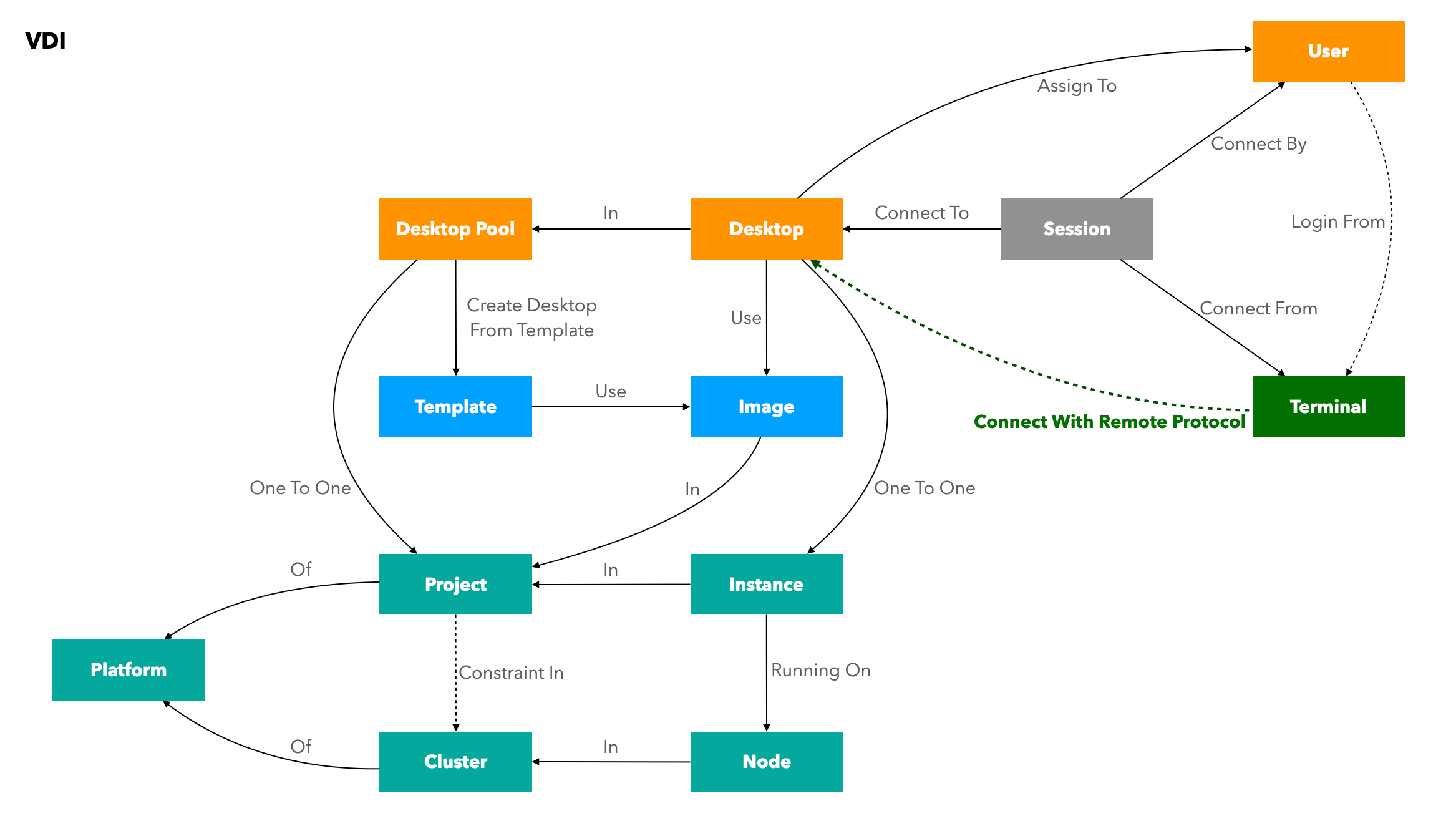
The management platform achieves logical mapping from "infrastructure" to "business objects" through abstract encapsulation of underlying heterogeneous IaaS resources.
2.1 Resource Mapping Logic
To integrate and be compatible with various IaaS platforms, the system establishes the following logical correspondence:
| Abstraction Level | IaaS Resource Layer Object (Platform) | Cloud Desktop Business Layer Object (VDI) | Correspondence Description |
|---|---|---|---|
| Logical Cluster | Cluster (Resource Cluster) | - | A collection of physical Nodes. |
| Infrastructure | Node (Physical Server) | - | Within a Cluster, providing compute power. |
| Logical Division | Project (Project/Group) | Desktop Pool (Desktop Pool) | One-to-one correspondence. Unified encapsulation of virtual resource division methods for different platforms. |
| Compute Instance | Instance (Virtual Machine) | Desktop (Cloud Desktop) | Functionality extension. Adding desktop business attributes based on an Instance. |
| Image Resource | Image | Image (Image) | Tenant Isolation. Supports division into system images and custom images. |
| Template Resource | Resource Template | Template (Template) | On-demand correspondence. Supports referencing underlying templates or customizing based on images and other parameters. |
2.2 Image Model Mapping (Image)
- Resource Correspondence: The business layer Image corresponds to the underlying image resource.
- Logical Division: To support custom images in multi-tenant scenarios, the system implements permission isolation for images:
- System Images: Public resources; all tenants have access and usage rights.
- Custom Images: Private resources; only visible to the tenant who created the image.
2.3 Template Model Mapping (Template)
- Scenario 1 (IaaS has Template Capability): The resource layer corresponds to the underlying via Resource Template, and the business layer Template references it and extends desktop business attributes.
- Scenario 2 (IaaS lacks Template Capability): The business layer Template can operate independently of underlying constraints, directly building business templates based on virtual machine images (Image), VM specifications, and other parameters.
2.4 From Instance to Desktop
- Atomic Operations: Underlying functions such as power management and VNC console are executed by calling APIs on the Instance.
- Business Enhancement: Desktop extends business attributes such as user assignment, policy group association, protocol ports, and login credentials.
3. Deployment Specifications and Environment Requirements
3.1 Environment Adaptation Restrictions
- Hardware Architecture: Currently only supports x86_64 and ARM64 architectures.
- Operating System: Only supports deployment in virtual machines running openEuler 22.03.
- Compatibility Check: If using third-party images, particular attention should be paid to checking whether
tarandsysctl -pcommands execute without errors.
3.2 Node Specification Recommendations
The management component defaults to a K3s cluster architecture of 1 Master + 2 Workers using 3 virtual machines:
- Virtual Machine Configuration: 8-core CPU / 16GB RAM / 200GB Storage.
- Management Scale: This default specification can stably manage approximately 1,000 cloud desktops.
4. Scaling Evolution and Reliability
4.1 Scaling Strategy (Scale-Up & Scale-Out)
- Scale-Up (Vertical Scaling): When scaling up, it is recommended to first adjust node specifications to 16-core/32GB.
- Scale-Out (Horizontal Scaling): If vertical scaling still doesn't meet performance demands, new virtual machines can be added as Worker nodes to the K3s cluster.
4.2 Operation & Maintenance Characteristics
- Recovery Time: After a management node restart, full functionality recovery is estimated to take approximately 15 minutes.
- Business Continuity: During management component restarts, established client connections to desktops are not affected, nor is the normal use of connected desktops affected (due to control plane and data plane separation).
Important Note The management component only provides control layer interfaces; all traffic at the cloud desktop protocol layer does not pass through the management component. This design, separating the control plane and data plane, ensures the continuity of desktop services during management component maintenance.