Agent
The xSpace Agent is a collection of core components installed and running inside the cloud desktop virtual machine. It acts as the remote desktop protocol server, directly determining the user's interaction experience and the depth of management control.
1. Component Composition and Core Functions
The agent component consists of multiple functionally complementary software packages, jointly realizing protocol transmission and control management.
1.1 Core Component List
- HSRServer: Remote desktop protocol server, responsible for desktop operating system login authentication (different from client login authentication), screen capturing and encoding, audio synchronization, keyboard and mouse operations, and microphone, camera, clipboard, folder, printer, game controller, digitizer redirection.
- USBRedirect: USB port redirection server, specifically handling control and business data transmission related to USB peripheral redirection.
- Mole: Cloud desktop operation and maintenance management agent, responsible for reporting desktop system information and status, data access audit information, agent version updates to the management component, and executing management commands.
- Other optimization packages: Optional optimization tools for specific operating systems, used to improve system performance.
1.2 System Service and Process Logic
The agent component uses a multi-process/service collaboration model in different operating systems to ensure high availability.
Windows Environment
| Service Name | Process Name | Core Function and Listening Port |
|---|---|---|
| hsr_service | HSRUserAuth | Responsible for desktop login authentication, defaults to listening on TCP 15701. |
| hsr_service | HSRAgent | Establishes remote links and streaming transmission, defaults to operating on TCP&UDP 15702. |
| hsr_service | HSRClipViewer | Clipboard daemon process for clipboard redirection in the streaming protocol. |
| hsr_protector | HSRProtector | Real-time protection of HSR-related working processes, automatically restarting upon detection of anomalies. |
| vdiUsbRedirect | vdi USB Redirect Service | Responsible for USB port redirection, defaults to listening on TCP 5703. |
| mole_service | moleService | Executes management plane tasks, audit reporting, and version updates. |
| mole_protector | moleProtector | Real-time protection of Mole-related working processes, automatically restarting upon detection of anomalies. |
"Special Port Note" Due to historical reasons, the USB redirection service listens on port 5703, not 15703. Please pay close attention to this when configuring firewall rules and public network port mapping.
Linux Environment
In Linux operating systems, the following three core agent services are uniformly managed via systemctl:
- mole: Control plane agent service.
systemctl status mole
● mole.service - Mole Service
     Loaded: loaded (/lib/systemd/system/mole.service; enabled; vendor preset: enabled)
     Active: active (running) since Fri 2026-01-09 17:21:54 CST; 1 months 1 days ago
   Main PID: 28415 (moleService)
      Tasks: 8 (limit: 9431)
     Memory: 14.2M
     CGroup: /system.slice/mole.service
             └─28415 /opt/apps/mole/moleService
- hsrserver: Protocol streaming service.
systemctl status hsrserver
● hsrserver.service - HSR Server
     Loaded: loaded (/lib/systemd/system/hsrserver.service; enabled; vendor preset: enabled)
     Active: active (running) since Fri 2026-01-09 09:10:40 CST; 1 months 1 days ago
   Main PID: 1377 (HSRUserAuth)
      Tasks: 37 (limit: 9431)
     Memory: 139.8M
     CGroup: /system.slice/hsrserver.service
             ├─   1377 /opt/apps/hsrserver/HSRUserAuth
             ├─2422034 /usr/bin/su user1 -c /opt/apps/hsrserver/HSRAgent  domain= user_name=user1 client_id=79472 features=671 agent_tcp_port=15702 client_os_arch=1 client_os_ty>
             └─2422042 /opt/apps/hsrserver/HSRAgent domain= user_name=user1 client_id=79472 features=671 agent_tcp_port=15702 client_os_arch=1 client_os_type=5 client_os_dist=0 >
- atusb: USB redirection service.
systemctl status atusb
● atusb.service - atUsb service
     Loaded: loaded (/lib/systemd/system/atusb.service; enabled; vendor preset: enabled)
     Active: active (running) since Fri 2026-01-09 09:10:39 CST; 1 months 1 days ago
   Main PID: 1044 (usbservice)
      Tasks: 2 (limit: 9431)
     Memory: 1.2M
     CGroup: /system.slice/atusb.service
             └─1044 /opt/atserver/hsrusb/usbservice
2. Architectural Advantage: In-Band Protocol Technology
The xSpace protocol belongs to the In-Band Protocol. Compared to traditional "out-of-band protocols" (such as VNC, SPICE) which intercept the screen at the virtualization layer, its advantages are significant:
- Underlying Decoupling: Resides and runs inside the desktop, not relying on a specific virtualization layer, offering excellent universality.
- High-Performance Capture: Can directly drive and utilize the capabilities of physical graphics cards (GPU), capturing raw images from physical graphics cards and performing efficient screen capture and encoding.
- Clear Resource Attribution: CPU usage during screen capture and encoding, and network traffic during sessions, are attributed to the virtual machine's own resource consumption, which is beneficial for infrastructure planning.
"Operating Constraints" Remote desktop sessions based on in-band protocols rely on the operating state of the cloud desktop itself. When the cloud desktop is powered off, it must first be powered on via the management component before a connection can be established (the operating system's boot screen will not be visible during connection).
3. Supported Operating Systems and CPU Architectures
The types of cloud desktop operating systems and CPU architectures currently supported by the agent are detailed below.
Note: Cloud Desktop OS vs Client OS
The operating systems listed here are only for those "running as a cloud desktop". Other unlisted operating systems (such as macOS, Android, etc.) are not supported for use as cloud desktop operating systems. Please do not confuse them with client-supported operating systems.
| Operating System Type | CPU Architecture | Specific Version Support Range |
|---|---|---|
| Windows | X86_64 | Windows 7, Windows 10, Windows 11 |
| Windows Server | X86_64 | Windows Server 2019, Windows Server 2022 |
| Linux (General) | X86_64 / ARM64 | Ubuntu, Debian, Deepin |
| Linux (Domestic Innovation) | X86_64 / ARM64 | UOS, Kylin, NfsDesktop |
Linux Cloud Desktop Special Requirements
- Interface Requirements: Must include a graphical interface, pure TUI server versions are not supported.
- Graphics Solution: Only X11 graphics solution is supported, Wayland is not supported yet; the system must install and use lightdm.
- Driver Dependencies: Extended display functionality requires the installation of virtio-gpu drivers related to the kernel version.
- USB Support: The USBRedirect component is highly dependent on the kernel version; the corresponding version package needs to be installed based on the actual kernel version number.
Description: The version release directory only contains commonly used agent versions. If a corresponding package is missing within the above range, please contact the manufacturer to obtain it.
4. Environment Preparation and Special Configuration
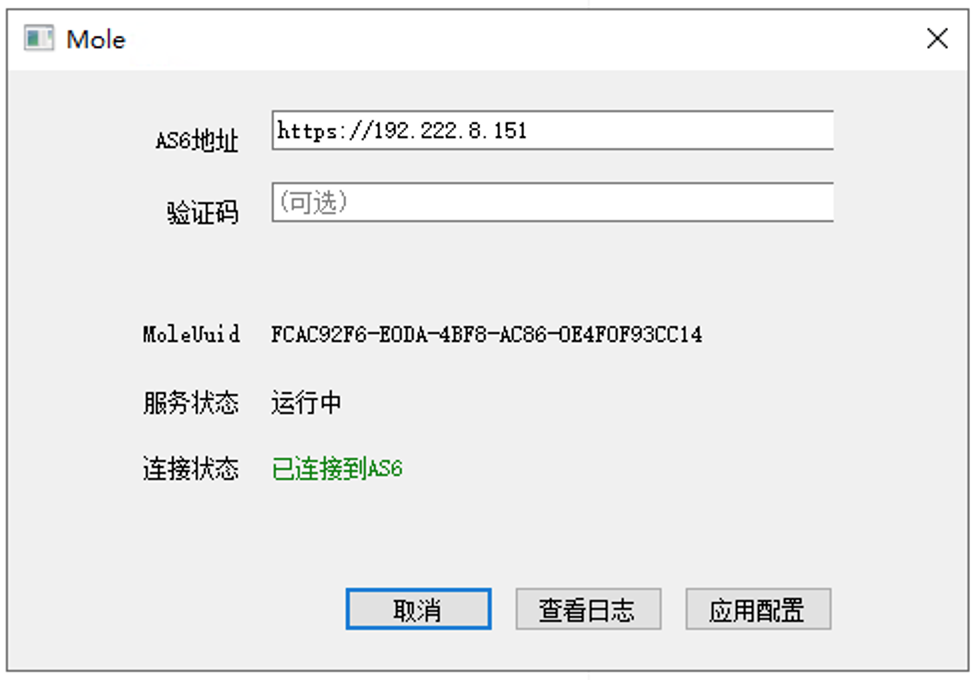
For the Mole agent to function correctly, it must be configured to point to the management component to establish a stable communication link. Depending on the desktop type, the following configuration methods are recommended:
Key Tip: It is crucial to ensure that the virtual machine becomes a "desktop" object in xSpace. If a virtual machine is merely created directly on the IaaS platform, its internal agent components (Mole) will not be accepted by the management component even if configured to point to it, leading to a failure in establishing communication.
4.1 Dedicated Desktop and Dynamic Desktop
When creating images (or templates) for dedicated and dynamic desktops, the Mole agent package should be pre-installed, and the management component address should be initially configured within the image.
- Operation Guide: For specific image packaging processes, please refer to the System Console -> Image Management -> Image Creation section.
- Uniqueness Note: When multiple instances are created based on an image, the desktop's UUID property will automatically remain unique with changes in virtual hardware information.
4.2 Hosted Desktop
For hosted third-party virtual desktops or physical desktops, the Mole agent must be installed independently inside each desktop, and the address configured via a verification code to point to the management component and be controlled by it.
- Operation Guide: For specific configuration processes, please refer to the Tenant Console -> Desktop Pool Management -> Hosted Desktop Pool section.