Introduction to Component Composition
1. Component List
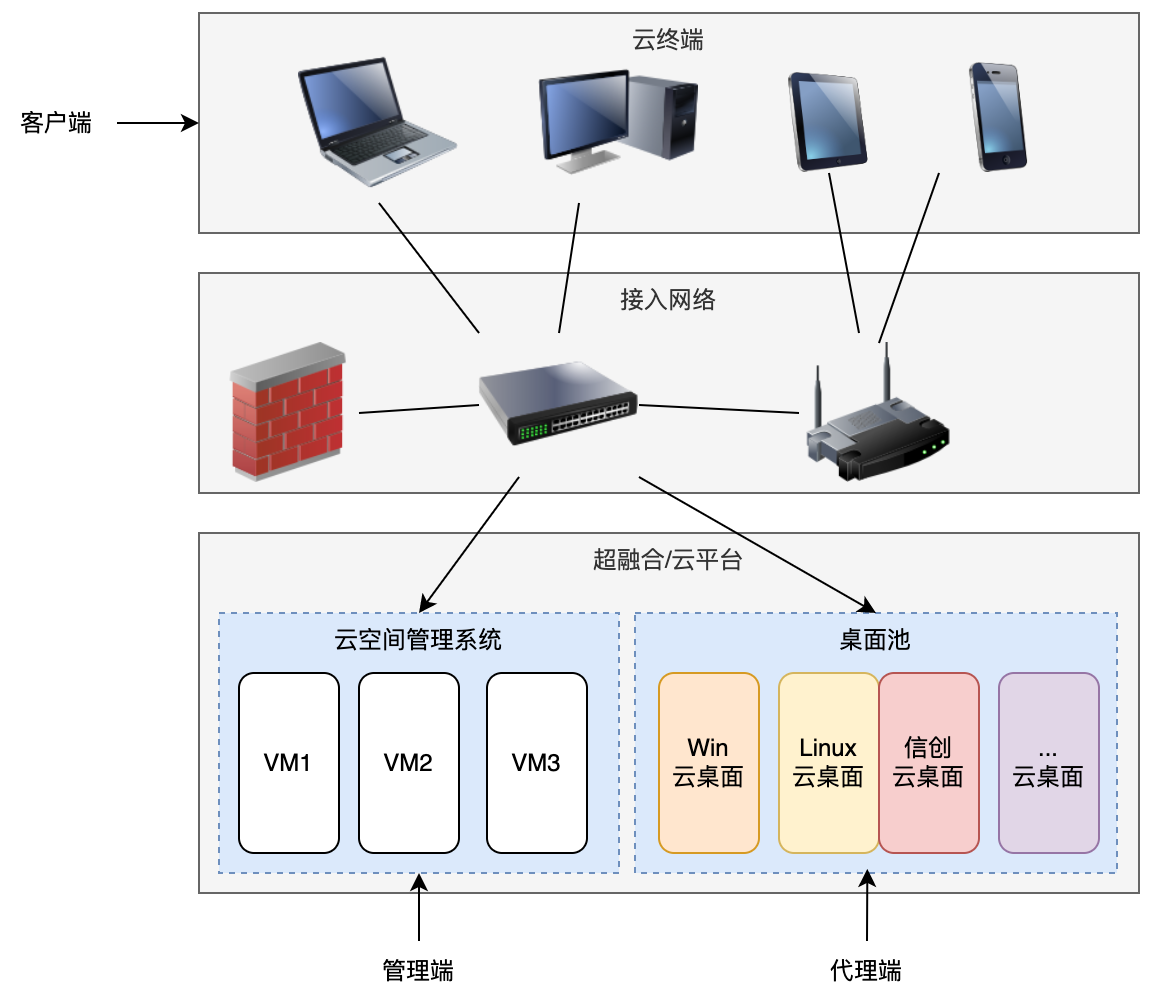
The xSpace cloud product software system consists of management components, agent components, client components, and access gateway components:
-
The management components are located in several virtual machines within the hyper-converged/cloud platform environment, serving as the web-based operation and maintenance entry point for administrators or accepting access requests from clients.
-
The agent components include several software packages installed and running inside the cloud desktop virtual machine. They typically start and remain running as optimized packages or background services, responsible for underlying desktop optimization, monitoring system dynamics for the management components, accepting control commands from the management components, and facilitating remote desktop interactions with clients.
-
The client components are responsible for providing the end-user with a terminal access interface. They are installed as standard applications on various types of local host devices such as PCs, laptops, thin clients, mobile phones, or tablets, or provided to end-users in a software-hardware integrated form.
-
The access gateway provides an external access mechanism for internet access to the internal cloud xSpace, including SDWAN gateway access and traffic forwarding services.
Note: In technical documentation, the management component is often abbreviated as AS6, the client as XSC, and the cloud desktop protocol as HSR.
The position of each of the above components within the overall architecture, and their interrelationships, are shown in the figure below:
2. Core Streaming Technology
Cloud desktops use streaming technology to encode the screen and audio of the desktop operating system located in the cloud into streaming media. This is then sent to the client via a TCP/IP network, where the client decodes and outputs it to display and audio devices. User-side input from peripherals such as keyboards, mice, cameras, and microphones is sent from the client to the cloud desktop via a TCP/IP network.
The streaming protocol used by xSpace adopts an in-band technical architecture, meaning the streaming protocol server and peripheral redirection server programs must reside and run within the cloud desktop operating system. This requires the network interface within the cloud desktop operating system and the client to be TCP/IP reachable (either directly reachable through a Layer 3 network within the LAN or reachable by forwarding through an access gateway).
3. Component Relationships
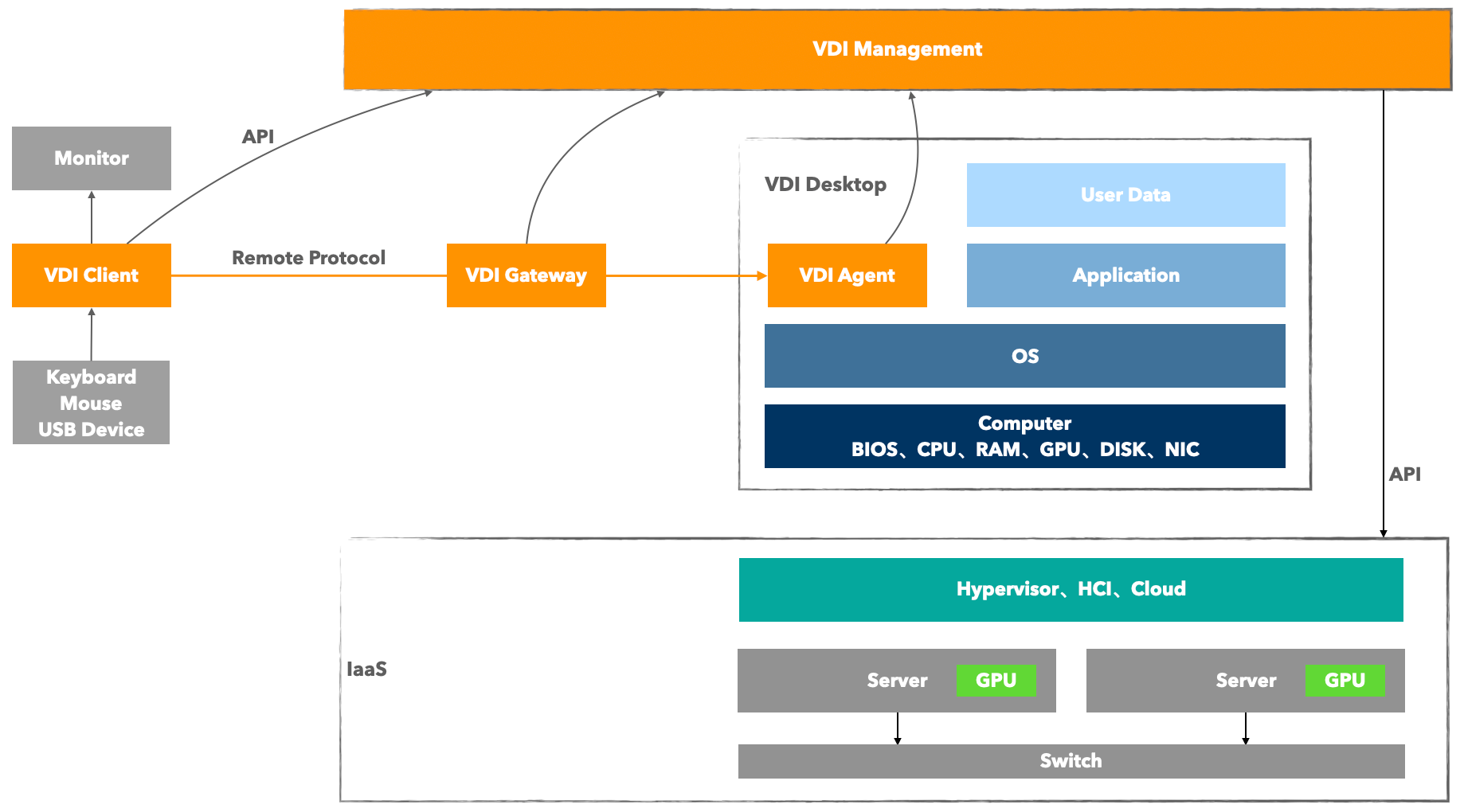
The figure below shows the system composition of xSpace and its relationship with peripheral software and hardware systems. Orange squares indicate components belonging to the xSpace product range.
4. Management Component
The core function of the management component is to abstract various forms of computer instances (including virtual machines and physical machines) into cloud desktop resources for unified management. By deploying protocol agent programs (Agents) in desktop operating system computer instances, it achieves the distribution, scheduling, and fine-grained policy control of cloud desktop resources.
4.1 Deeply Integrated Cloud Desktop Management (IaaS Collaboration Mode)
For virtual machines in mainstream IaaS cloud platforms, the management component deeply integrates with their APIs via southbound interfaces, achieving seamless collaboration between the control plane and the infrastructure layer.
- Resource Synchronization: Automatically synchronizes resource objects such as templates, images, VM specifications, networks, storage, clusters, projects, and virtual machines from the IaaS layer.
- Full Lifecycle Management: Through API calls, it enables batch creation, import, deletion, configuration changes, password resets, and other operations for desktops (i.e., VM instances).
- Power and Out-of-Band Management: Directly issues commands via the management interface to perform functions such as powering on, powering off, restarting, and opening the console (VNC Console) for virtual machines.
4.2 Flexible Hosted Desktop Management (General Resource Mode)
For computer instances lacking standard management interfaces (e.g., independent physical machines, VMs not integrated with the environment), the management component provides compatibility through a hosted desktop mode.
- Access Mechanism: Desktop resource registration is completed by statically entering key information such as IP addresses and desktop operating system login credentials, then assigned to users.
- Functional Boundaries: These resources support full remote protocol access. However, due to the lack of underlying API support, the management component cannot perform power on/off, restart, or open out-of-band console operations from the outside.
4.3 Multi-Dimensional Internal Management Communication
In addition to external control based on the IaaS layer, the management component also provides rich APIs and message interfaces for desktop Agents.
- Status Awareness: The Agent reports the installation and running status of the agent inside the desktop through interfaces.
- Internal Control: Achieves fine-grained configuration and policy delivery for compute instances from within the operating system, complementing the internal system dimension that external management cannot reach.
4.4 Control Plane and Data Plane Separation Architecture
The system adopts an advanced control flow and data flow separation design, ensuring high performance and stability in large-scale deployments from an architectural perspective.
| Dimension | Interaction Logic | Traffic Characteristics |
|---|---|---|
| Control Plane | Clients call management component APIs for login, obtaining desktop lists, and issuing power on/off commands. | Extremely lightweight, containing only API commands and status signaling. |
| Data Plane | Clients directly connect (or forward via SDWAN gateway) to the protocol server program within the desktop. | Carries high-bandwidth streaming protocols, peripheral redirection, and other data flows, does not pass through the management component. |
"Architectural Advantages" This separation design ensures that even if the management component is under heavy load or experiences a brief anomaly, established cloud desktop sessions will not be interrupted, while also greatly increasing the network throughput ceiling.
5. Agent Component
The Agent component is a core component running within the cloud desktop operating system, residing as system services and application processes. Its main responsibilities can be divided into Remote Protocol Server (Data Plane) and Desktop Control Management (Control Plane).
5.1 Remote Desktop Protocol Server (Data Plane)
As a protocol server, the agent component collaborates with the client to provide users with a smooth remote access experience. It mainly includes the following two core components:
5.1.1 USBRedirect Peripheral Redirection
Based on "Port Redirection" technology, it achieves seamless integration between client USB peripherals and cloud desktops.
- Technical Principle: Captures control I/O and data I/O of USB devices at the bus layer, using device filter drivers to mount original devices within the cloud desktop.
- Driver Requirements: Corresponding hardware drivers need to be installed in the cloud desktop for application-layer access.
- Support Scope: Specifically refers to USB interface devices. Non-USB interfaces (e.g., serial ports, network ports) require adaptation via USB adapters.
5.1.2 HSRServer Streaming Protocol Server
Responsible for all remote interaction functions except USB redirection.
- Basic Interaction: Display screen, audio playback (speakers), keyboard and mouse input.
- Device Redirection: Includes microphones, cameras, printers, game controllers, digitizers, etc. In this mode, the client application layer processes device data and generates virtual devices within the desktop.
- Data Sharing: Supports clipboard and folder (drive) redirection.
5.2 Desktop Control Management Program (Control Plane)
In addition to protocol transmission, the internal management services and processes (Mole) of the agent component are responsible for fine-grained control within the desktop:
- Status Reporting: Responsible for real-time collection and reporting of desktop system parameters and running status.
- Version Maintenance: Achieves automated version upgrades for HSRServer, USBRedirect, and Mole itself.
- System Integration: Supports automated joining of AD domain controllers and other enterprise-level management tasks, and supports dynamic extension of future management functions.
6. Client Component
The Client component is the core access vehicle for users to access cloud desktops, responsible for connecting terminal peripherals and providing remote interaction capabilities, ensuring users get a consistent experience with a local PC.
6.1 Full-Scenario Interaction
The client component bridges local hardware and cloud computing power:
- Peripheral Support: Supports connection and redirection of peripherals such as monitors, keyboards, mice, audio devices, cameras, printers, and USB drives.
- Operation Synchronization: Users interact with the cloud desktop's system, software, and data in real-time through the client, experiencing low-latency, high-fidelity feedback.
6.2 Full Terminal Forms
To cover different business needs, the client component offers the following two forms:
- Software Client: Can be installed on PCs (Windows/macOS/Linux), mobile phones, and tablets (Android) and other general terminals, adapted for flexible office scenarios.
- Thin Client: Dedicated hardware access device, running in Kiosk Mode. Upon power-on, it directly enters the cloud desktop access environment. Users cannot operate the local terminal system, suitable for high-security, easy-to-manage standardized office scenarios.
6.3 Network Link Model
Client deployment must meet the following network accessibility requirements:
- Management Link: Needs to be able to access the management component's API interface to complete identity authentication and desktop scheduling.
- Protocol Link:
- Internal Network Direct Connection: The client and cloud desktop are in the same network segment or routing is reachable, establishing a direct protocol connection.
- Public Network Access: The client connects to the public IP of the SDWAN Access Gateway via the internet, and then the gateway proxies and forwards to the internal network cloud desktop, achieving secure cross-domain access.
7. Access Gateway
The SDWAN Access Gateway is a core component in the cloud desktop architecture responsible for secure proxy and protocol forwarding, primarily used to solve access issues in public network environments.
7.1 Deployment Scenario Determination
- Pure LAN Environment: If cloud desktop access is only required within the internal network, the access gateway is not required. Clients can directly connect to desktops.
- Internet Access Environment: If users need to remotely access internal network desktops from the public network (Internet), the access gateway must be deployed to enable secure traffic penetration and forwarding.
7.2 NAT Mapping Alternative Solution Description
In specific public network access scenarios, if the following conditions are met, an SDWAN access gateway may not be deployed:
- Operation Logic: Through a network firewall or router, perform NAT port mapping for the
HSRServerport (default 15701/15702) andUSBRedirectport (default 5703) of the internal network desktop, converting them into directly accessible public network ports. - Access Method: In this case, the client only needs to directly access the mapped public network port to connect to the desktop.
7.3 Core Functions and Network Requirements
The access gateway acts as a protocol traffic relay in the architecture, and its network configuration must meet:
- Internal Network Interoperability: The gateway needs to be assigned an internal IP to ensure smooth network communication with the backend cloud desktop resource pool.
- Public Network Access: The gateway needs to have a fixed public IP address (or corresponding public mapping) as the entry point for external client connections.
7.4 Deployment Forms and High Availability Cluster
The gateway is deployed as a Linux virtual machine on the IaaS platform, supporting the following two deployment modes:
- Single-Machine Mode: Basic deployment form, meeting basic access requirements.
- Cluster Mode: Supports deploying multiple virtual machines as a cluster, with capabilities for dynamic routing and load balancing. Clustered deployment can effectively distribute traffic pressure and provide business continuity guarantees (high availability).
7.5 Cluster Management and Resource Association
The management component supports unified scheduling of multiple gateway clusters:
- Multi-Cluster Support: Multiple gateway clusters can exist in parallel within the system, adapting to multi-data center or multi-region scenarios.
- Flexible Association: Administrators can bind gateway clusters to specific cloud desktop resources as needed, thereby enabling corresponding desktops to be accessed from the public network.